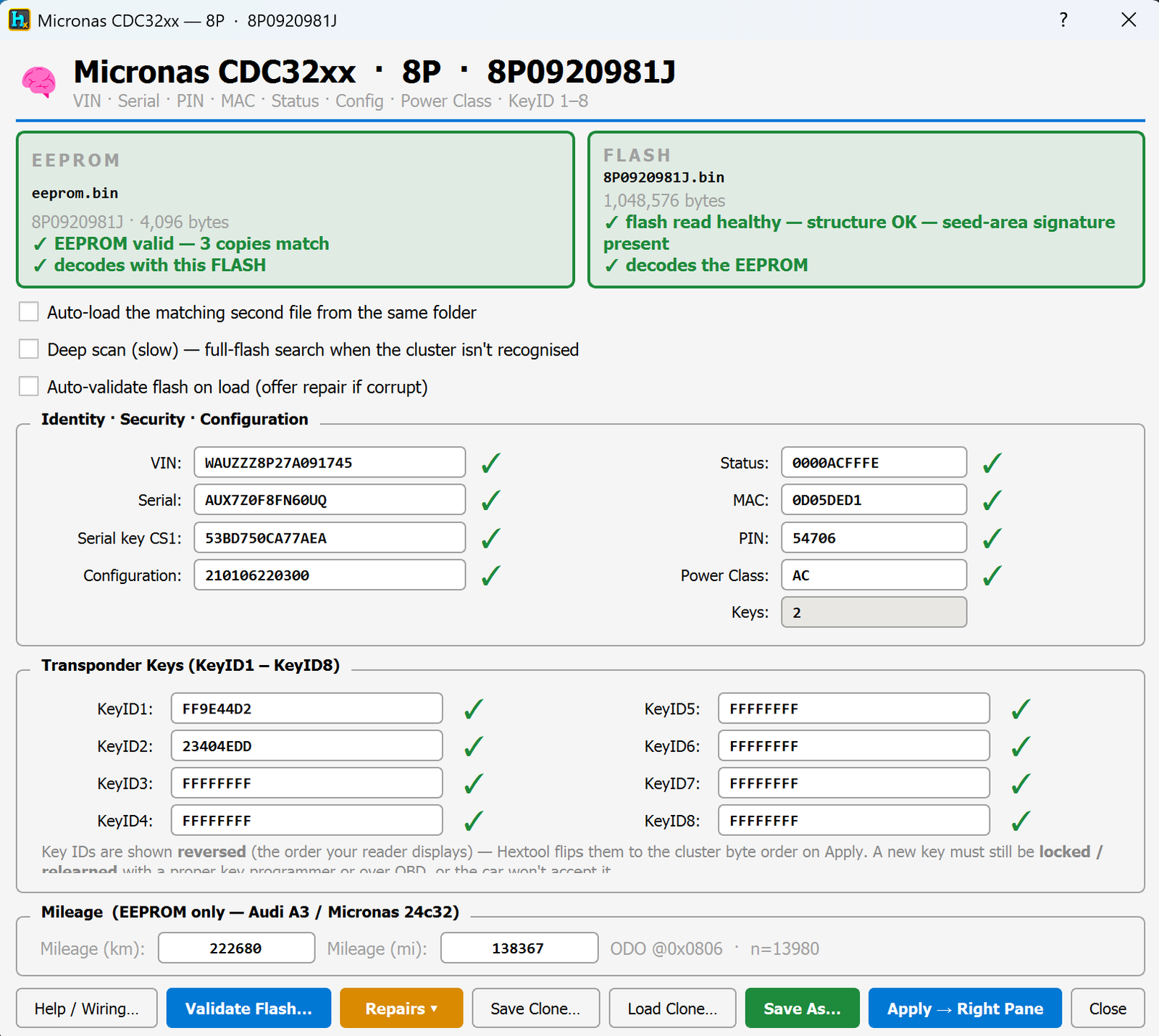
Micronas CDC32xx is the instrument cluster chip used in Audi A3/TT (8P) and VW 1K0-series clusters, which also stores the car's immobilizer (IMMO) data. HexTool reads, repairs and edits everything on it — VIN, keys, PIN, mileage — straight from the cluster's memory dumps.
How to open it
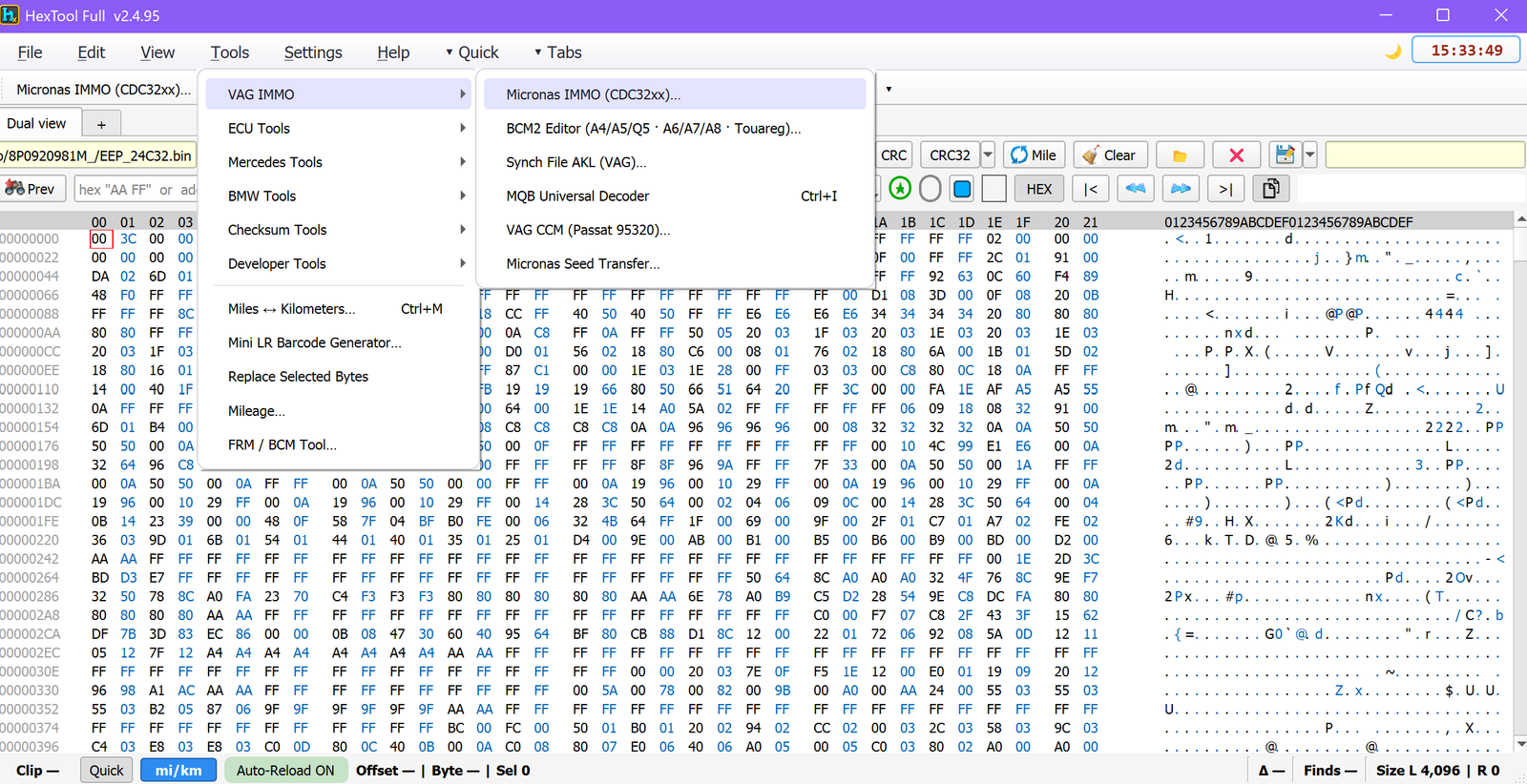
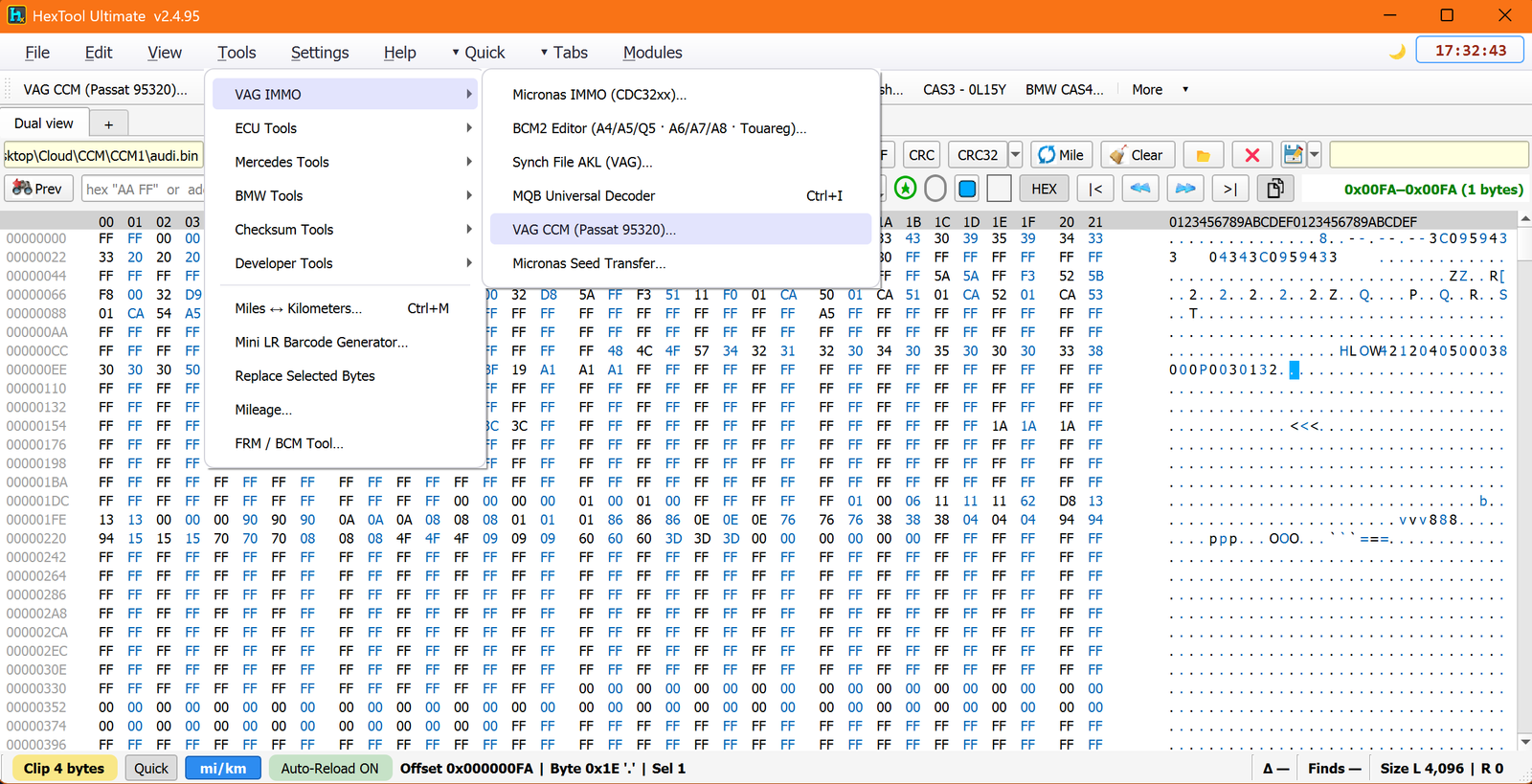
From the main HexTool window: Tools → VAG IMMO → Micronas IMMO (CDC32xx)…
The two files it needs
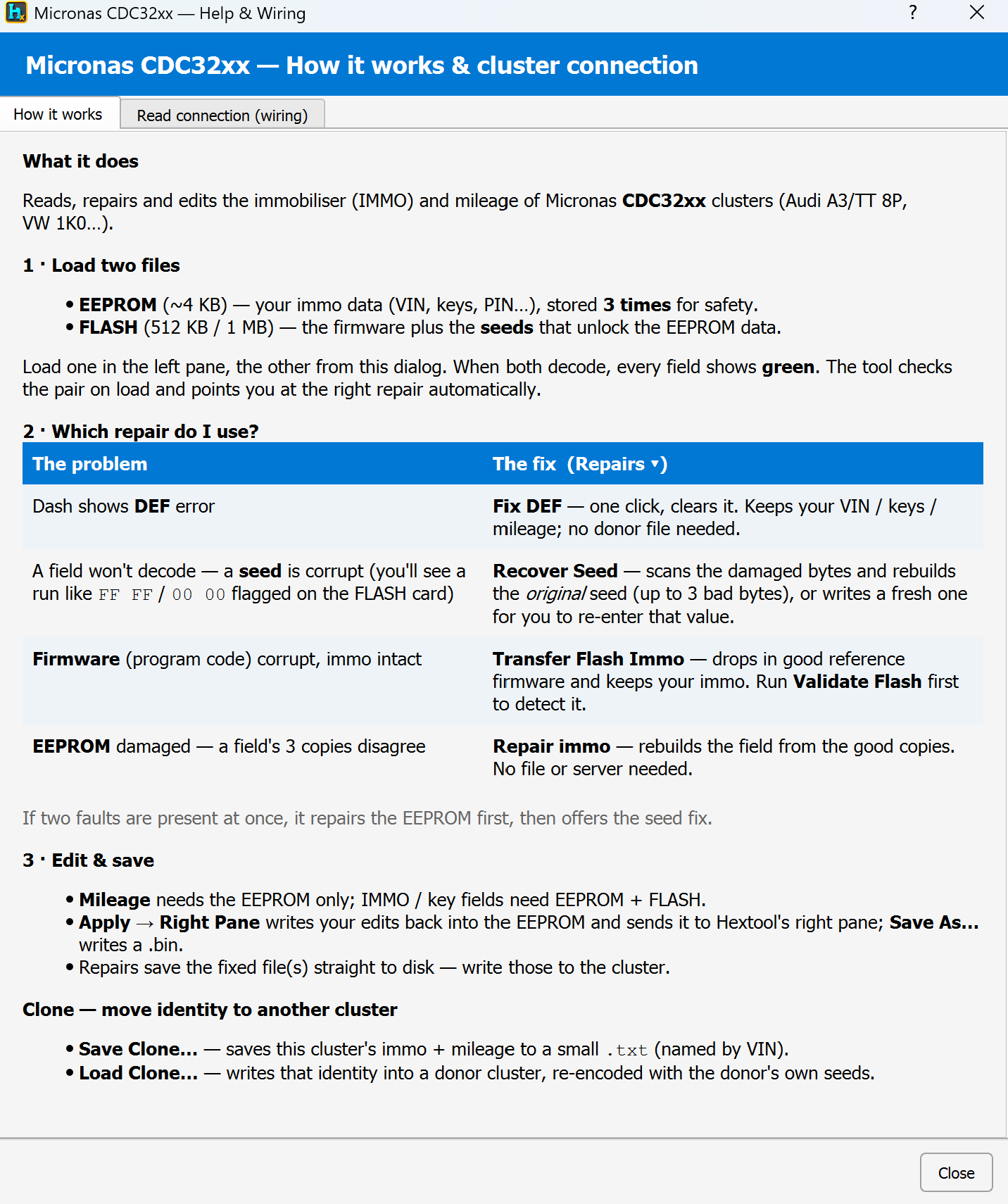
EEPROM (~4 KB) — the immo data itself: VIN, keys, PIN… stored 3 times for safety/redundancy.
FLASH (512 KB / 1 MB) — the cluster's firmware, plus the seeds that unlock/decode the EEPROM data.
Load one file into the left pane and the other from this dialog. When both decode correctly every field shows green, and the tool automatically points you at the right repair if something's wrong.
What you can do with it
View & edit
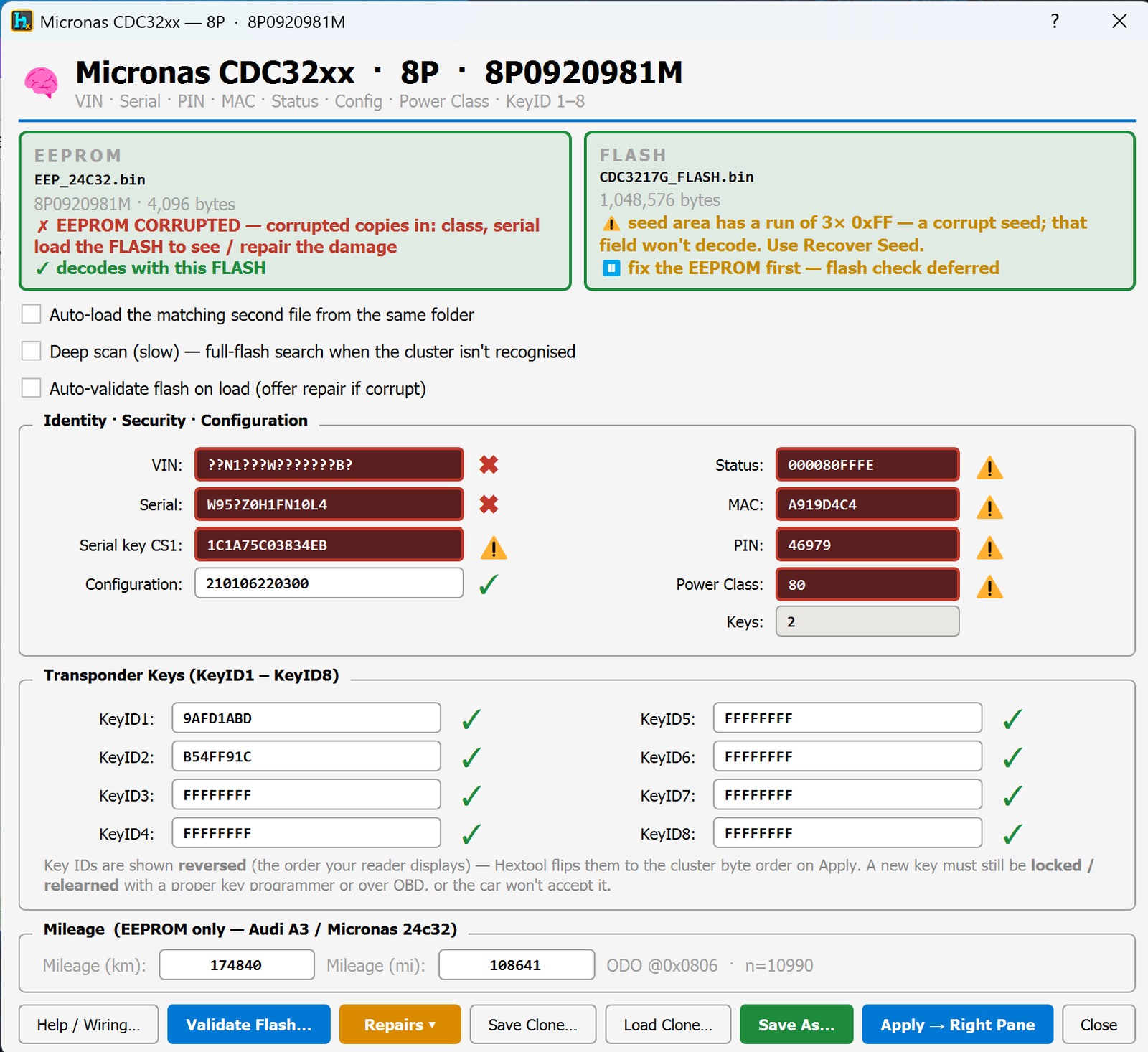
VIN, Serial, PIN, MAC, Status, Configuration, Power Class, all with a green/red/warning check mark showing whether each field is trustworthy.
Transponder Keys (KeyID1–8) — see all 8 possible key slots at once.
Diagnose & repair — pick the right fix automatically
Problem
Fix
Dash shows a DEF error
Fix DEF — one click, keeps VIN/keys/mileage, no donor file needed
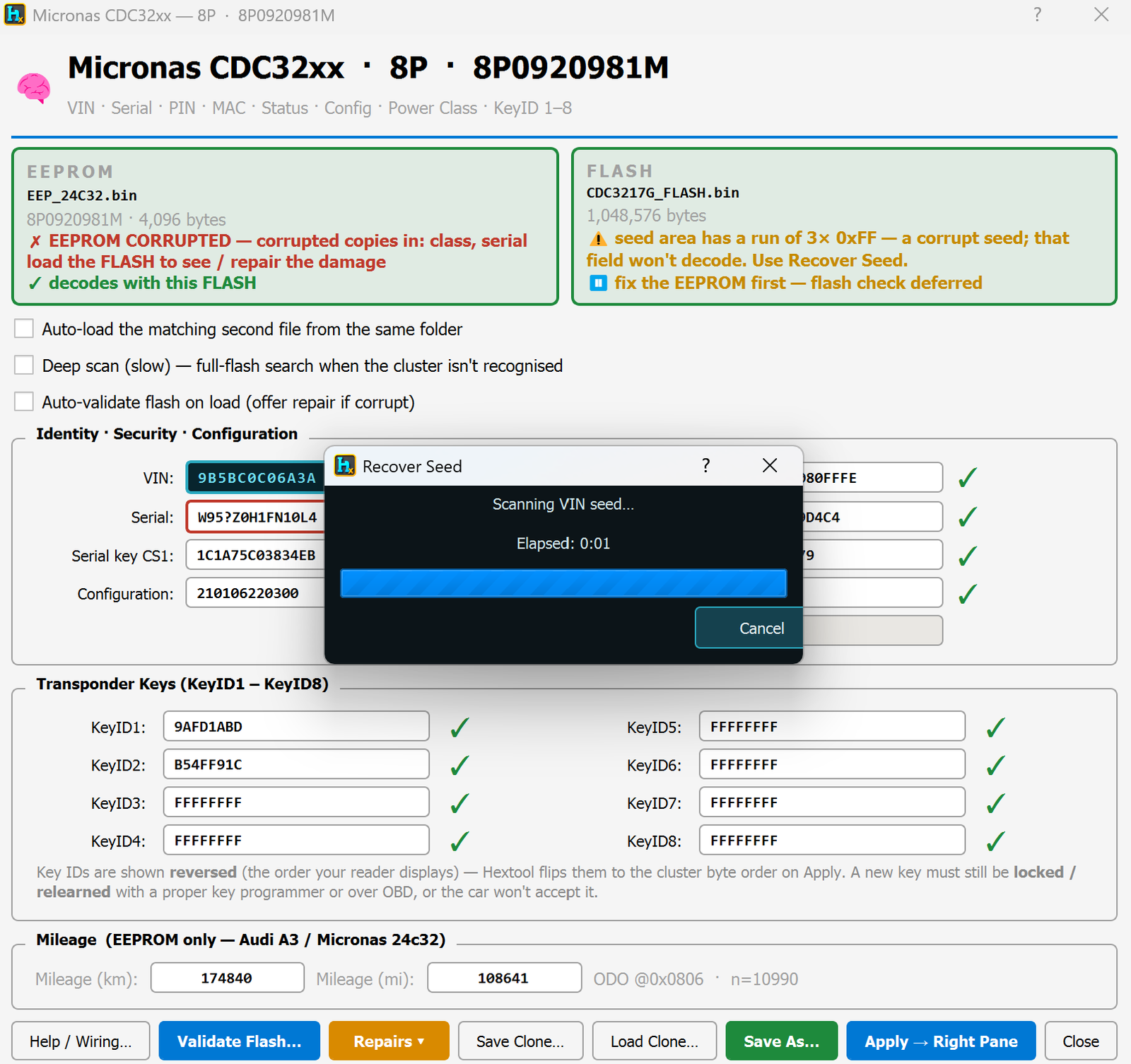
A field won't decode — a seed is corrupt
Recover Seed — scans the damaged bytes and rebuilds the original seed (up to 3 bad bytes), or writes a fresh one for you to re-enter that value
Firmware corrupt but immo data intact
Transfer Flash Immo — drops in good reference firmware while keeping your immo (run Validate Flash first to confirm this is the issue)
EEPROM damaged — a field's 3 stored copies disagree
Repair immo — rebuilds the field from the good copies, no file or server needed
If two faults are present at once, HexTool repairs the EEPROM first, then offers the seed fix.
Recovery Wizard
Rather than leaving you to work out which repair applies, the Recovery Wizard walks you through it step by step: it explains in plain language what's actually wrong with the file(s) you loaded, then guides you to the correct fix instead of you having to read the field-by-field status yourself.
Online flash validation & download
Validate Flash online — compares your flash against the correct reference for that exact part number and reports whether it's healthy or corrupted.
Download the same part number — if you don't have a clean reference file, HexTool can fetch one online matching your cluster's part number.
⚠️ Important: the flash isn't just firmware — it also contains the immo seed. You can't simply drop in a downloaded flash and call it done, because a straight swap would wipe/corrupt the immo data tied to your specific EEPROM. Handle it one of two ways:
Flash present but corrupted — download the healthy reference file and use Transfer Flash Immo so the immo/seed data from your original flash is preserved and merged into the clean firmware.
Flash completely missing/unreadable — download a healthy flash for the part number and use it to rebuild the module, then repair the immo from the EEPROM side (the EEPROM's 3 redundant copies are what let HexTool reconstruct the immo data onto the rebuilt flash).
Clone — move an identity to another cluster
Save Clone… — saves this cluster's immo + mileage to a small .txt file (named by VIN).
Load Clone… — writes that saved identity into a donor cluster, automatically re-encoded with the donor's own seeds.
Extra options
Auto-load the matching second file from the same folder (skip manually picking both EEPROM and FLASH).
Deep scan (slow) — full-flash search when the cluster type isn't automatically recognised.
Auto-validate flash on load — offers a repair immediately if corruption is detected.
Validate Flash… — manual on-demand check.
Save As… / Apply → Right Pane — write your edits to a .bin file or push them straight to HexTool's right pane.
Built-in help
Help / Wiring… — opens an in-app guide explaining how the tool works and how to physically connect to the cluster to read it.
Typical use cases
Clearing a DEF error on the dash without touching VIN/keys/mileage.
Recovering from a corrupted seed so the immo data can be read again.
Repairing an EEPROM with mismatched redundant copies without needing a donor file.
Cloning one cluster's identity onto a replacement/donor cluster.
Fixing corrupted firmware while preserving the original immo data.
Requirements
An EEPROM dump (~4 KB) and a FLASH dump (512 KB/1 MB) from the cluster.
No special reader hardware is required by the software itself — see Help / Wiring… in the tool for the physical connection details for reading the cluster.
VAG Tools / VAG CCM (Passat 95320)
VAG CCM — Passat 95320 IMMO
Available in ProFullUltimate
What is CCM?
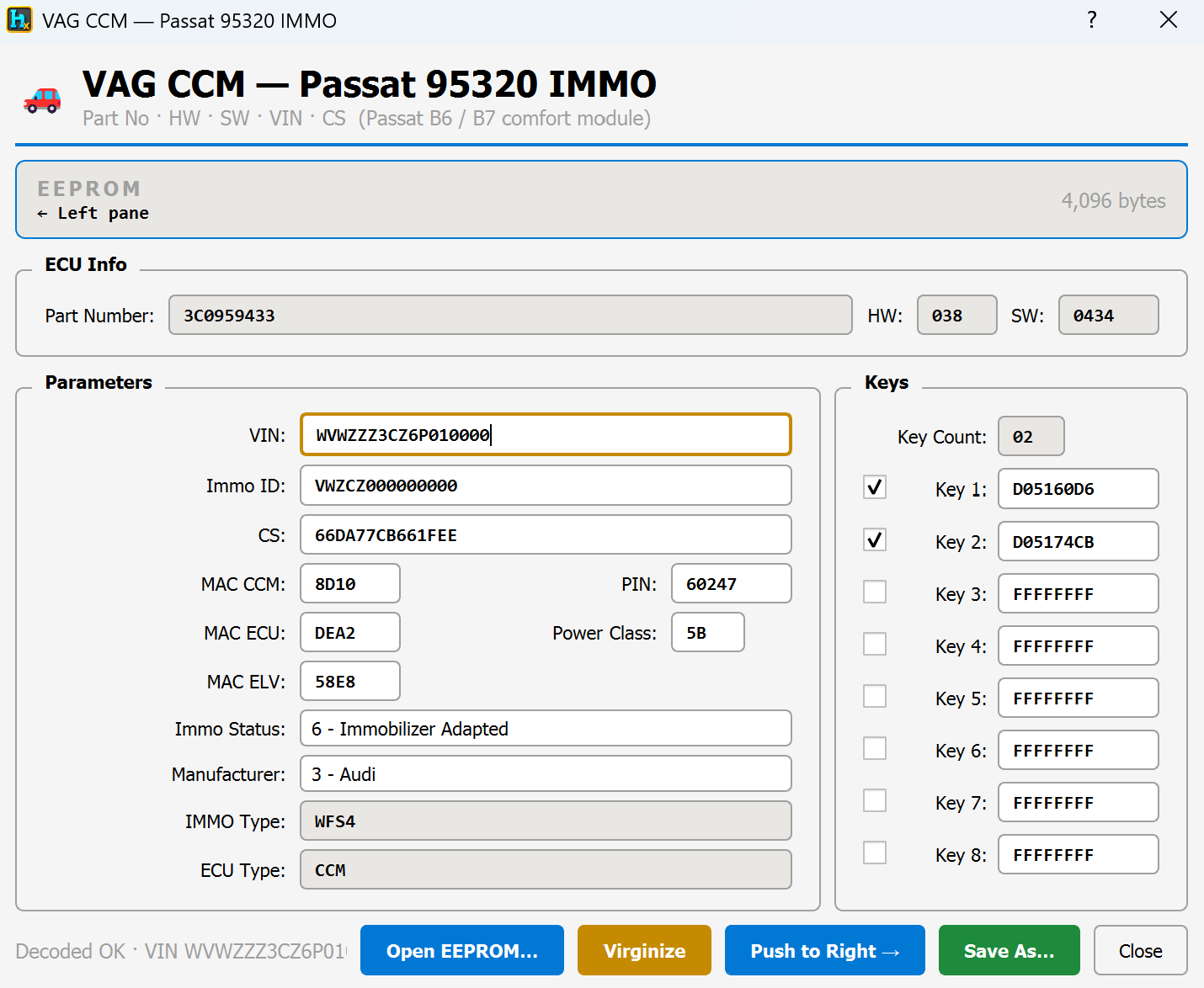
CCM is the comfort/convenience module used on VW Passat B6/B7 (95320/ST95320 EEPROM chip). Alongside comfort functions it also stores the car's immobilizer (IMMO) data — VIN, keys, PIN, security checksums. HexTool decodes that EEPROM dump on one screen so you can view, edit or reset it.
How to open it
From the main HexTool window: Tools → VAG IMMO → VAG CCM (Passat 95320)… If a 4 KB CCM dump is already loaded in the left pane it's picked up automatically; otherwise use the dialog's own Open EEPROM… button.
What you can do with it
ECU info
Part Number, HW, SW — module identification straight from the dump.
Parameters
VIN and Immo ID.
CS — the security checksum tying the immo data together.
MAC CCM / MAC ECU / MAC ELV — the module's paired MAC addresses for the comfort module, engine ECU and steering lock (ELV).
PIN and Power Class.
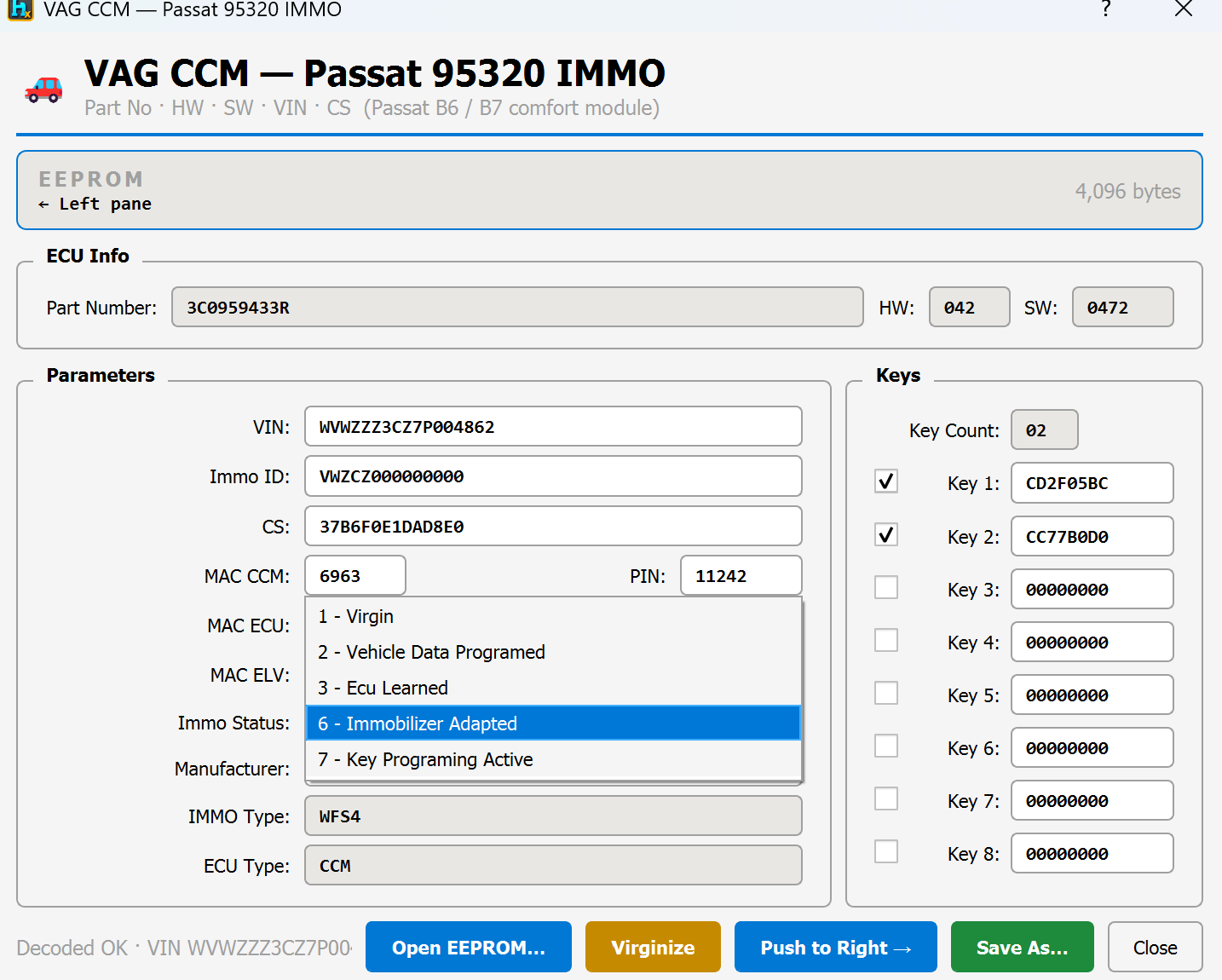
Immo Status — shown as a plain-English dropdown instead of a raw number: 1 - Virgin, 2 - Vehicle Data Programed, 3 - Ecu Learned, 6 - Immobilizer Adapted, 7 - Key Programing Active.
Manufacturer (e.g. Audi/VW/VW Special) and IMMO Type / ECU Type (WFS4 / CCM) for reference.
Keys
Key Count plus all 8 key slots, each with a checkbox showing whether that slot is actually in use — unused slots read FFFFFFFF.
Reset & transfer
Virginize — sets Immo Status back to "1 - Virgin" (New Vehicle) so the module can be re-adapted to a car. This only touches the status byte — keys, CS, MAC and PIN are all left intact, so nothing else is lost.
Push to Right → — sends the edited EEPROM straight to HexTool's right pane, ready to save or write back.
Open EEPROM… / Save As… — load a dump from disk, or save your edits to a .bin file.
Typical use cases
Reading out VIN, keys and immo status from a Passat B6/B7 comfort module.
Resetting a used CCM to virgin state so it can be adapted to a different car, without touching its existing keys/security data.
Checking Immo Status in plain language instead of decoding the raw byte yourself.
Requirements
A CCM EEPROM dump (4 KB, 95320/ST95320 chip).
VAG Tools / BCM2 Editor (Immo5)
BCM2 Editor (Audi A4/A5/Q5 · A6/A7/A8 · Touareg)
Available in ProFullUltimate
What is BCM2?
BCM2 is the VAG Immo5 body control module used on Audi A4/A5/Q5, Audi A6/A7/A8 and VW Touareg. It's the module that ties together the ELV (steering lock), the engine ECU, the TCU (gearbox), and the car's keys. HexTool decrypts and edits its data so you can view/repair VIN, keys, ELV status, TCU/Slave coding, and more.
How to open it
From the main HexTool window: Tools → VAG IMMO → BCM2 Editor (A4/A5/Q5 · A6/A7/A8 · Touareg)…
The two files it can use — and why sometimes only one is enough
BCM2 modules come in a few different hardware/chip families, and that's what decides whether you need just the D-Flash or both files:
Chip / family
What it covers
P-Flash needed?
DF703381 (64 KB D-Flash) — Audi A4/A5/Q5
Uses a fixed, known decryption key
D-Flash alone is enough
NEC uPD70F3634 (64 KB EEPROM) — Audi A4/A5/Q5
Uses a fixed, known decryption key
D-Flash alone is enough
DF70F3380 / 95320 (4 KB EEPROM) — Audi A4/A5
Uses a per-vehicle key stored inside the P-Flash
P-Flash required
NEC "BCM2 2.0" (per-vehicle key) — Audi A6/A7/A8, Touareg
Uses a per-vehicle key stored inside the P-Flash
P-Flash required
In short: some BCM2 chips are encrypted with the same key on every module (D-Flash decodes on its own), while others generate a unique key per car and store it inside the P-Flash — for those, HexTool can't decrypt anything until the P-Flash is loaded too. If P-Flash is required and missing, the tool tells you plainly: "The P-Flash is required (the firmware key lives there). Load it first."
What you can do with it
Identify & decode
Decode — reads whichever file(s) are loaded and shows Identification (HW, Version, HW class, SW, IMMO type, Module), ELV info (Type, HW iD, VIN, MAC, Power Class, CS), and all the Parameters (FAZIT, VIN, checksums for Key/ECU/TCU/ELV, MACs, coding status, key list).
View
Identification block — hardware/software part numbers, IMMO scheme, module type.
ELV block — steering lock type, hardware ID, VIN, MAC, power class, checksum.
Parameters block — VIN, all the CS (checksum) fields tying ECU/TCU/ELV/BCM together, MAC addresses, ELV/TCU/Slave-ECU active state, and the key list (Key 1–7, with unused slots shown as FFFFFFFF).
Status CP — shows Learned (a real key/module pairing exists) vs Virgin (factory-blank, not yet paired to a car).
Edit & apply
Apply Edits — write changes made to the visible fields back into the loaded flash data.
Coding operations (pick from the dropdown, then press Run):
Virgin CP — reset the module back to factory/virgin state (clears the learned pairing).
Remove ELV — disable the ELV (steering lock) requirement in the coding.
Remove TCU — disable TCU (gearbox) coding.
Set TCU — (re-)enable TCU coding.
Set Slave — enable Slave-ECU coding.
Load ELV… — load a separate ELV file into the session.
Save Data… — save your edits to a file.
Send D-Flash → Right Pane — push the modified D-Flash straight into HexTool's right pane, ready to save/write.
Typical use cases
Decoding a BCM2 module to read VIN, keys and ELV/TCU status.
Removing the ELV requirement so the module can run without the original steering lock (e.g. ELV failure).
Disabling or re-enabling TCU/Slave-ECU coding when swapping components.
Resetting a used BCM2 module to virgin state before fitting it to another car.
Requirements
D-Flash (EEPROM/D-Flash dump) — always required.
P-Flash (512 KB program flash) — required only for the per-vehicle-key chip families (DF70F3380/95320 and the A6/A7/A8/Touareg "BCM2 2.0" NEC variant). Not needed for DF703381 or NEC uPD70F3634.
VAG Tools / Immo5 / MQB AKL Synch Generator
VAG Immo5 / MQB — AKL Synch File Generator
Available in ProFullUltimate
Video walkthrough
What is this?
A generator for the synch file needed when doing All-Keys-Lost (AKL) or adding keys on VAG Immo5 and MQB platform cars. Instead of the dealer/vendor tool building this token for you, HexTool builds it locally from the checksums (CS) of the cluster and the other modules fitted to the car.
How to open it
From the main HexTool window: Tools → VAG IMMO → Synch File AKL (VAG)…
How it works
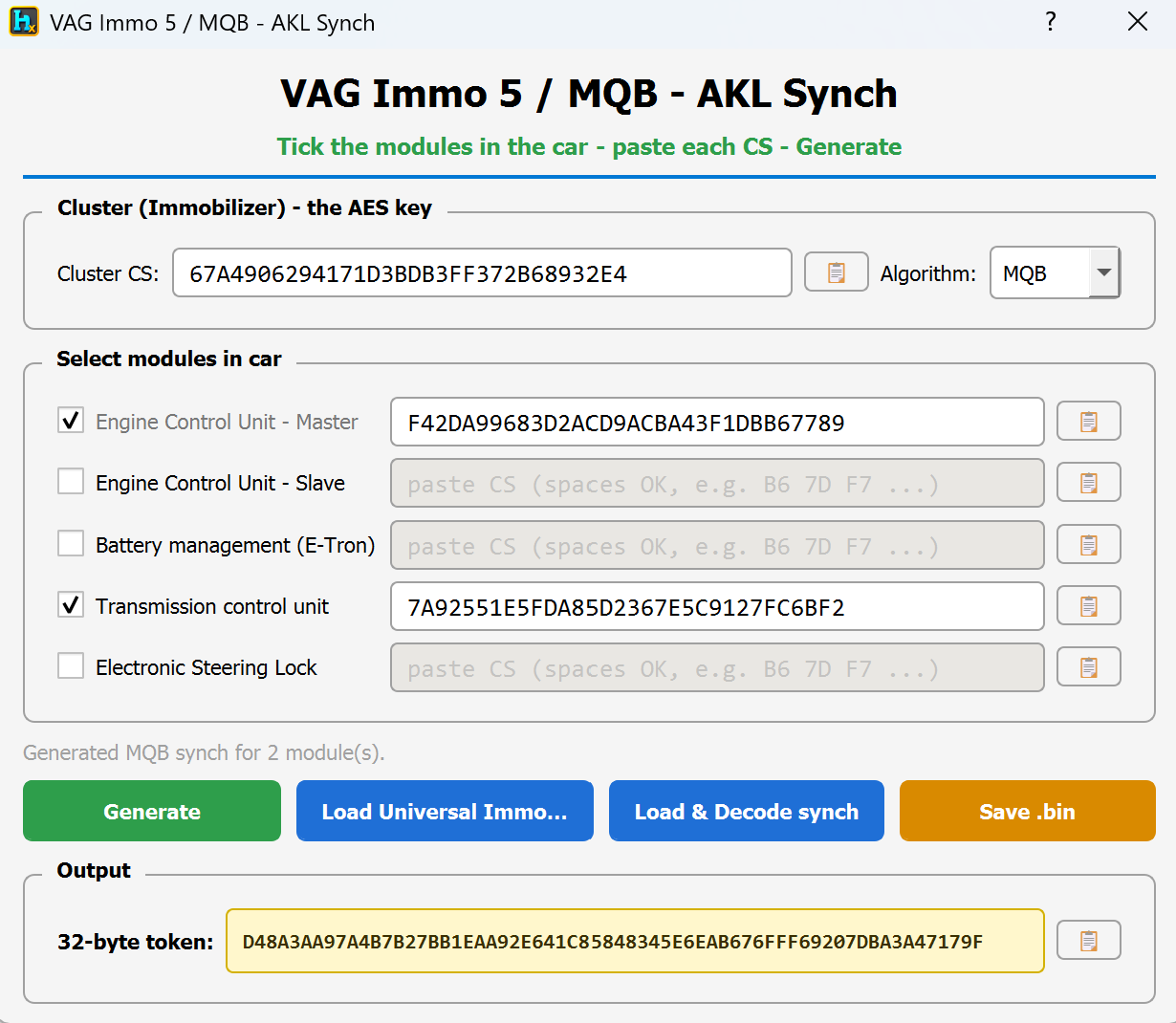
Pick the algorithm — MQB or Immo 5 — matching the car's platform.
Paste the Cluster CS — this is the immobilizer/AES key source, taken from the instrument cluster.
Tick each module actually fitted to the car and paste its CS:
Engine Control Unit – Master
Engine Control Unit – Slave
Battery management (E-Tron)
Transmission control unit
Electronic Steering Lock
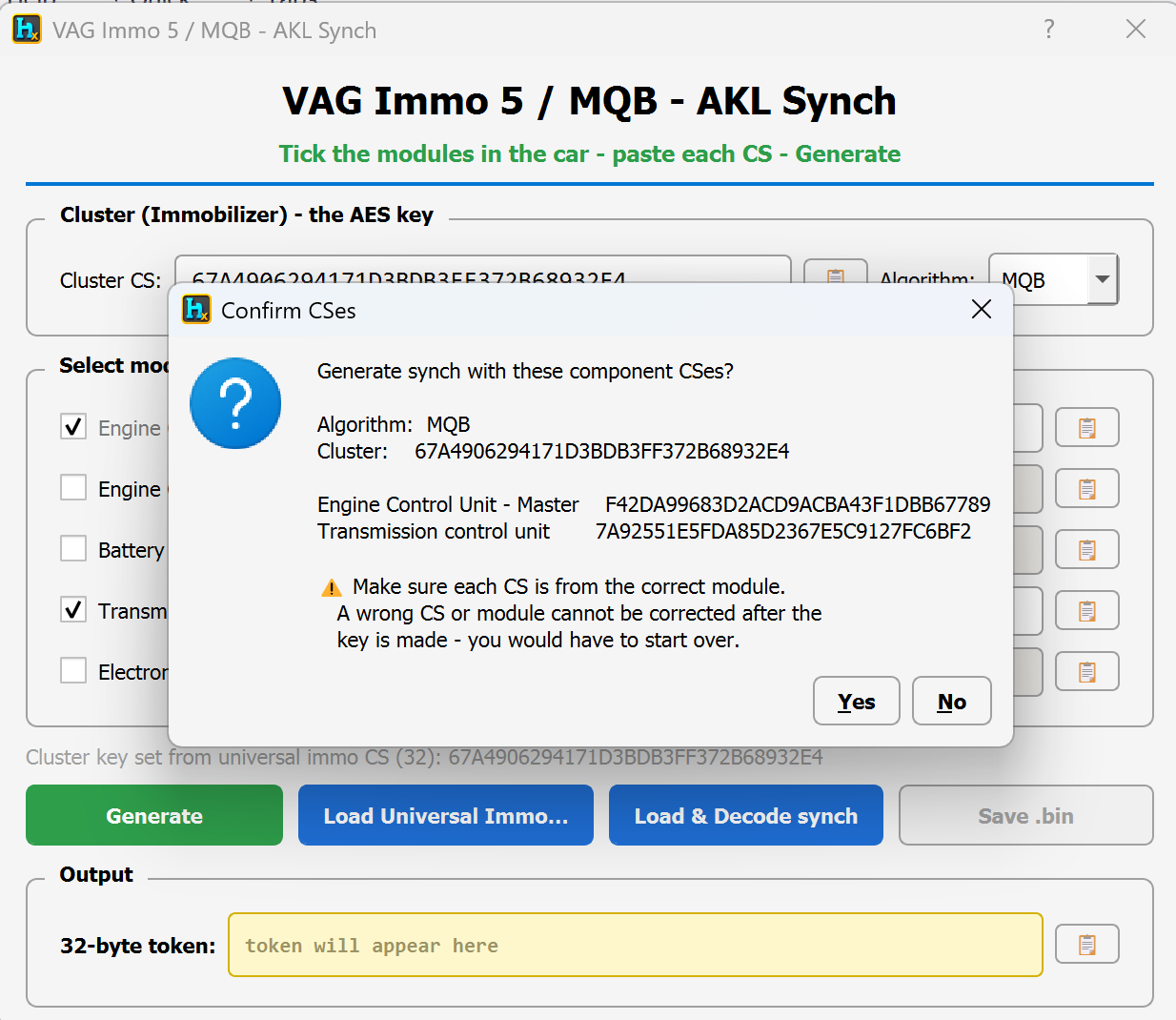
Press Generate. HexTool shows a Confirm CSes summary — algorithm, cluster CS, and each ticked module's CS — before building anything.
The result is a 32-byte token, ready to copy or save as .bin and feed into your AKL/spare-key workflow.
⚠️ Double-check every CS belongs to the right module before confirming. A wrong CS or wrong module selection can't be corrected after the key is made — you'd have to start the whole AKL process over.
Other ways to load data
Load Universal Immo… — load a universal immo file (the same kind the MQB Universal Decoder reads) to pull CS values in automatically instead of pasting them by hand.
Load & Decode synch — load an existing synch file to decode/verify it.
Save .bin — save the generated token to a file.
Typical use cases
Generating the synch file for an All-Keys-Lost job on an Immo5/MQB car.
Adding a spare key where the dealer tool's synch step needs to be reproduced locally.
Verifying an existing synch file by loading and decoding it.
Requirements
The CS (checksum) of the cluster, plus the CS of every immo-relevant module actually fitted to the car (only tick what's present).
VAG Tools / MQB Universal Decoder
MQB IMMO Universal Decoder
Available in ProFullUltimate
What is this?
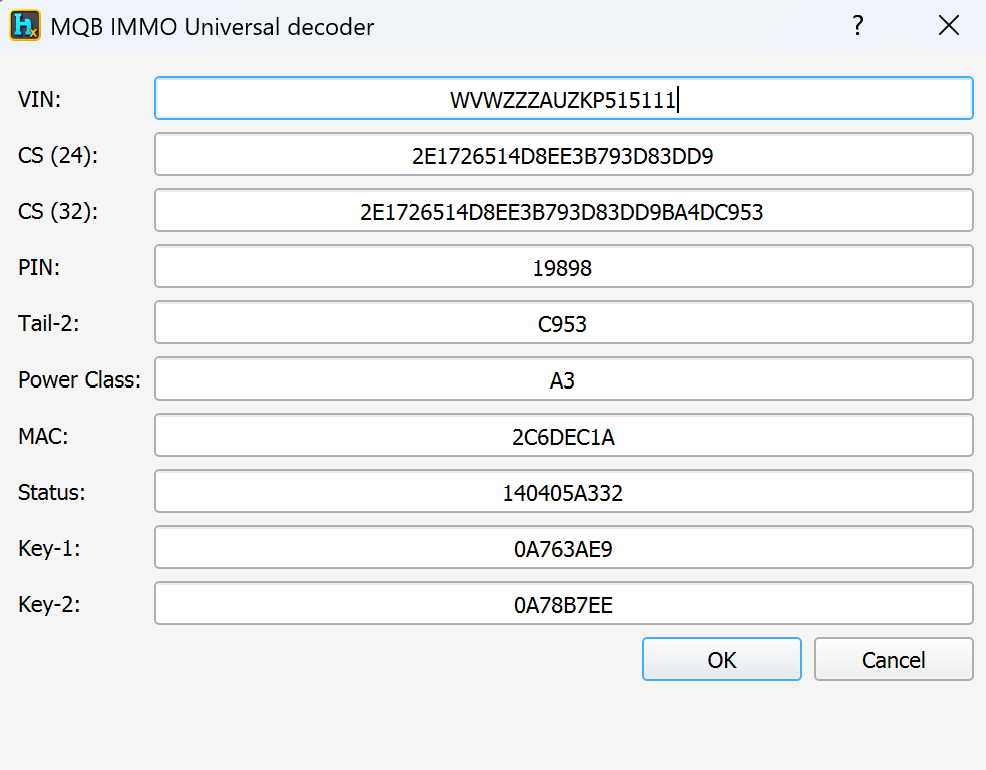
A quick decoder for the small universal immo file (189 bytes) that various vendor key-programmer tools export when reading a VAG MQB-platform immobilizer. Instead of needing that vendor's own software to make sense of the file, HexTool opens it and shows every field in plain view.
How to open it
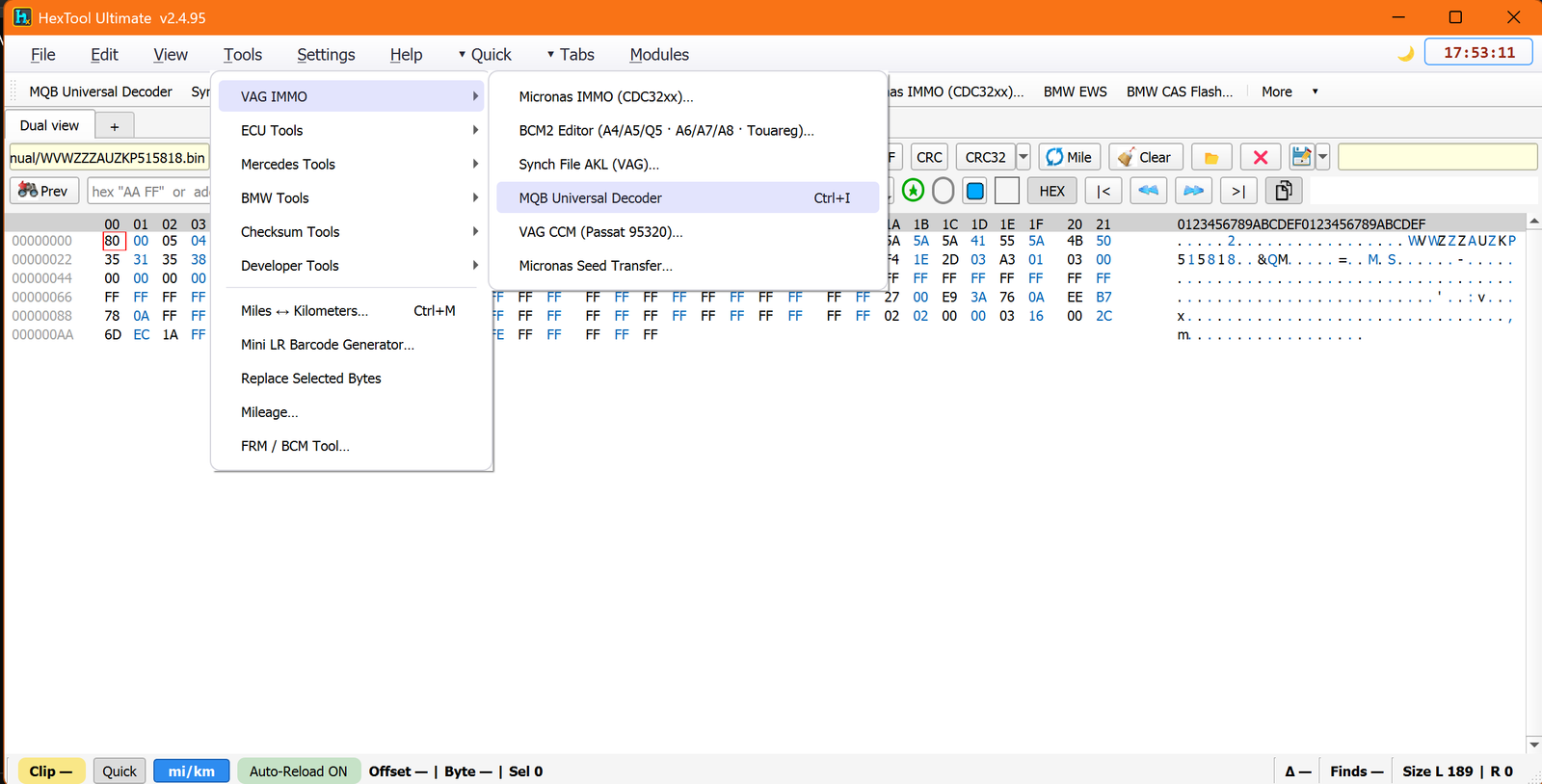
From the main HexTool window: Tools → VAG IMMO → MQB Universal Decoder (shortcut Ctrl+I).
What it decodes
VIN
CS (24) and CS (32) — the security checksum, shown both as its short 24-char form and the full 32-char block.
PIN
Tail-2
Power Class
MAC
Status
Key-1 and Key-2
Why it's useful
This is the format produced when doing spare key or AKL (all keys lost) work on MQB cars — most vendor programmers generate this small immo file as part of that process. Rather than treating it as an opaque blob, HexTool decodes it straight away so you can read out the VIN, checksums, PIN and key data you need without switching tools, and cross-check or reuse that data directly inside HexTool.
Requirements
A 189-byte universal MQB immo file exported by a compatible vendor programmer.
🛠️
Coming soon
This guide is being written and will be published here soon. Check back shortly — documentation is added regularly.